Tuesday, 4 January 2011

Work in progress III

The work in progress so far is that several puzzles have been created showing different stages of the puzzle, the first piece, finishing a collection and a puzzle from the beginning. The actual content hasn't been finished - this is the bare bones for now.

When a QR code is scanned this will be the screen they come to. The login lets the user access their account anywhere and store the data to their account.

Once in, the user can flit between the piece and a letter (content depending on the piece). An example of this can be seen in a previous post. From here the user can either go to the puzzle or go to the menu. 

 The piece will appear on the puzzle. With a simple drag and drop action the piece can be slotted into the correct position.


On the menu, currently the icons for each puzzle are the actual puzzle themselves, however I may change these so that they have a different appearance like maybe a company logo for the companies collection. Just so that icons don't remain blank and empty.

This is the puzzle for what happens at the end of finishing one. One idea is that some sort of mini-game can become available, or the user can enter a competition relating to that product.
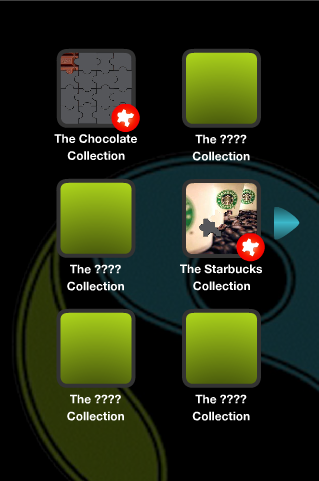
This is the menu screens. The user can go between these screens for their puzzles. The red icon means that there is a piece that needs to be placed. One problem here is that the red icon doesn't go away yet when the remaining piece has been placed. This is something which I will deal with next time I sit and finish the app.


This is going to be the puzzle which will demo the final one. It demonstrates the whole puzzle, starting and finishing. 


To be finished is the menu glitch, contents like the piece and letter. and if there is time, icons images changed.

Tuesday, 30 November 2010

Making the App - work in progress II

Here is the puzzle ready to use in the app. It still do have all the piece in as I just created the whole thing, which at a later date will be edited so that it demonstrates different stages of the puzzle.

The difference with this puzzle is that the actual pieces disappear when the piece is put in place and the 'shadow' piece turns transparent reveling that part of the image. This is so it creates a much better final image that doesn't have the outlines of the pieces shown as you can see in the earlier puzzle.


Tuesday, 23 November 2010

Making the App - work in progress

When I've come to design the application, I have started from the user receiving the puzzle piece. This, again, has been created in Flash using Action Script 2.0. Some of the illustrations were created in Illustrator.


The user receives the piece, enters their log in which keeps all the data about what they have collected. Once the details are entered the user then logs in.


The user then views the piece. A tap/click on the piece takes the user to the letter and another tap/click takes them back to the piece. From either screen the user can go to the main menu by clicking on the menu button or they can carry on to the puzzle with the next button. 


Here is the new puzzle being made. I am making some adjustments from the previous one which I will explain in my next post when it has be completed.

Making the Puzzle

I started to make the puzzle in Flash. I have used Action Script 2.0. It works by matching up the puzzle piece to its "shadow" and slowly fits the puzzle together. This is ideal as I only need to the puzzle to fit just one piece at a time. The images do have more than one piece on as I was trying to produce the whole puzzle first. The pieces were made in Photoshop and imported nto Flash.

The pieces ready to use. 


Some of the pieces in place.


All the pieces put together.

Monday, 8 November 2010

The Pitch

Here is the presentation I created to present my idea to the rest of the class.


QR Code

This is another test of the QR codes. This one links to a page of my website with a puzzle piece on it.

Tuesday, 2 November 2010

The Concept

After a few discussions in the seminars, I have decided to create a app with focuses on people go out and exploring Fairtrade for themselves and finding out how they can bring it into their own lives. To do this, I will use a QR code which links up to the content the user gets.

Here is an example of one which I used as a tester to see how it works. It should come up with the words It Works!.


It does require a QR scanner to view which you can get for free for iPhones and Androids. I have an Android and have used ScanLife.

The idea is that there will be several of these on a variety of FairTrade products which the users will "collect".

Wednesday, 27 October 2010

More of the Idea

This concept is more of a marketing strategy, introducing Fairtrade products to the users. As there is a vast amount of products available with several types of each product, my idea is to introduce them all by creating a puzzle for each product. So say the puzzle is for Chocolate, each chocolate product there is will have its own QR tag which will relate to a new puzzle piece. Each piece will be fitted into it's place. Once done, the user will receive a letter from a chocolate producer. They will also receive a small one with it piece. the sketches below will demonstrate the flow of the app.


The code is scanned and a piece of the puzzle is revealed.


The piece is 'flipped' over to reveal a letter. 


The piece is fitted into the puzzle. 


Once the puzzle is complete, the user can play a game/video etc.

This application will be created for the use of children as they will have the pulling factor when it comes to get the products. Children have a mass interest and once this is introduced to them and a their friends are involved they will want to be involved. Another thing is that their curiosity will make them want to try the product, putting the pressure on the parent to purchase the product.

Monday, 4 October 2010

Potential Concepts

Here are some initial ideas I had.
  1. Video/Animation advert
    • Create  an animation using graphics to draw people in
    • Possible ideas include kinetic typography or characters
    • It could be used on the website as an opening to the site
  2. A phone or Web app
    •  Use a tag on packaging of products which can then be viewed on the site in in a application.
    • The tag can be linked to a video or image.
  3. A new website
    • Create a new site format where the home page gets right to the point. 
    • Or create a new site where Fairtrade is bought solely from the producer to create a new brand highly respected. 

There is the presentation which I created for presenting my ideas.


What Do Charities Do??

Here is a list of some of the things charities do to raise awareness and get donations.
  1. Collections
  2. T.V. campaigns 
  3. Letter campaigns
  4. Websites
  5. Events - ranges from small markets to large televised events
  6. Talks in schools
  7. Sell products in charity stores and within some big stores
  8. Get celebrities to support them

Tuesday, 28 September 2010

RSD Brief

In the module brief we are given the option to either go for a RSD brief or find out own. After looking at the RSD briefs, the one that I chose is called Giving and Getting. The brief can be found at the RSD website.


The charity which I will be designing for is Fairtrade. This i due to it being a positive charity which I feel could have a greater impact as it doesn't focus on making people feel bad about things happening in the world. It gives people a guilt -free chance of helping people so that they do genuinely feel good about themselves and also learn more about what they purchase.